
Bestiary: Difference between revisions
From TibiaScape
More actions
No edit summary |
Rewrite page as a concise factual reference and repair stale information |
||
| (2 intermediate revisions by the same user not shown) | |||
| Line 1: | Line 1: | ||
The Bestiary | <div class="tsw-article"> | ||
The '''Bestiary''' records supported creature kills automatically. Open it from the '''Bestiary''' button in the client top menu. | |||
<gallery mode="packed" heights="140"> | |||
File:Bestiary Button.png|Open Bestiary | |||
File:Bestiary Module Open.png|Tracked and recently killed creatures | |||
File:Bestiary Magnifying Glass.png|Search creatures | |||
</gallery> | |||
== Use it == | |||
# Kill a supported creature to update its Bestiary progress. | |||
# Search for a creature you have killed. | |||
# Select the star to keep it in the tracked list. | |||
- | An empty search shows the most-killed creatures first. | ||
</div> | |||
[[Category:Creatures]] | |||
[[Category:Game systems]] | |||
[[ | |||
[[ | |||
Latest revision as of 01:57, 26 August 2026
The Bestiary records supported creature kills automatically. Open it from the Bestiary button in the client top menu.
-
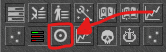 Open Bestiary
 -
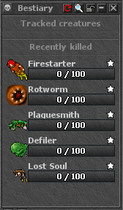 Tracked and recently killed creatures
 -
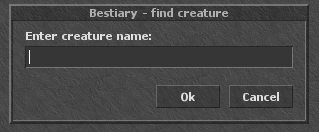 Search creatures


Use it
- Kill a supported creature to update its Bestiary progress.
- Search for a creature you have killed.
- Select the star to keep it in the tracked list.
An empty search shows the most-killed creatures first.