|
|
| (6 intermediate revisions by the same user not shown) |
| Line 1: |
Line 1: |
| == Guilds in TibiaScape == | | <div class="tsw-article"> |
| | '''Guilds''' are player groups with shared chat, ranks, member management, stored gold, buffs, and war controls. |
|
| |
|
| In TibiaScape, guilds are player-run communities that bring adventurers together for socializing, group quests, and coordinated events. Joining a guild offers access to exclusive chat channels, shared resources, and a supportive network that helps players tackle tougher challenges and enjoy the game more collaboratively. It is essential for anyone considering playing the game long-term.
| | {{Guide status|status=Server and client source verified|verified=26 August 2026}} |
|
| |
|
| What makes [[guilds]] unique in [https://TibiaScape.com TibiaScape] is that guilds can level up, unlock more member slots, and gain buffs together as a team.
| | == Create a guild == |
| | # Reach level 10 and carry a guild permit. |
| | # Open the guild management window. |
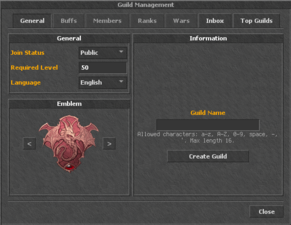
| | # Choose the guild name and settings, then select '''Create Guild'''. |
|
| |
|
| Anyone can create a guild in TibiaScape, but you need to meet the following requirements:
| | The permit is consumed when the guild is created. A level-one guild starts with space for 10 members; each guild level adds one member slot. |
|
| |
|
| Be at least level 10.
| | <gallery mode="packed" heights="150"> |
| | File:Guildintro.png|Create a guild |
| | File:Guildfounded.png|Guild overview |
| | File:MembersPage.png|Member management |
| | File:Ranks.png|Ranks and permissions |
| | File:Guild Buffs.png|Guild buffs |
| | File:Guild War.png|War controls |
| | </gallery> |
|
| |
|
| Possess a guild permit, which can be purchased from our store.
| | == Management == |
| | * Members can deposit gold toward guild levels. |
| | * Leaders can manage ranks, permissions, invitations, settings, buffs, and wars. |
| | * New guilds receive seven days of Pacifist Mode. |
| | * Saved guild buffs cannot be changed again for four hours. |
| | </div> |
|
| |
|
| == Creating a Guild ==
| | [[Category:Community]] |
| [[File:Guildintro.png|left|thumb|389x389px|Found Guild Page]] | |
| | |
| To create a guild, open the guild management module, choose a name, and click Create Guild. There are no extra costs beyond the guild permit.
| |
| | |
| Note:
| |
| | |
| Once created, guild names cannot be changed, so choose carefully.
| |
| | |
| <br>
| |
| <br>
| |
| <br>
| |
| <br>
| |
| <br>
| |
| | |
| == Managing a Founded Guild ==
| |
| [[File:Guildfounded.png|left|thumb|388x388px|After creation]]
| |
| | |
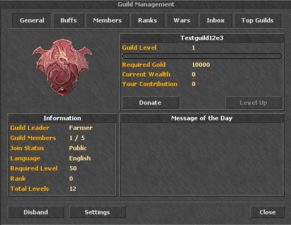
| After the guild has been created, you can start donating to the guild, viewing its overview, and unlocking member slots.
| |
| | |
| <br>
| |
| <br>
| |
| <br>
| |
| <br>
| |
| <br>
| |
| | |
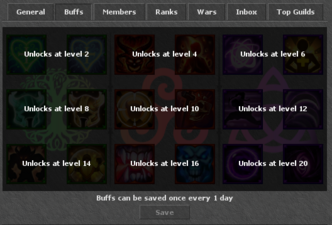
| == Guild Buffs ==
| |
| [[File:Guild Buffs.png|left|thumb|Guild Buffs]]
| |
| | |
| Guild buffs are unlocked by leveling up the guild. Buffs can only be changed once every 24 hours.
| |
| | |
| <br>
| |
| <br>
| |
| <br>
| |
| <br>
| |
| <br>
| |
| | |
| == Guild Members ==
| |
| [[File:MembersPage.png|left|thumb|Members Page]]
| |
| | |
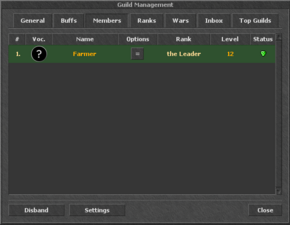
| As a guild leader, you have full control over members on the Members Page, where you can:
| |
| | |
| Modify ranks
| |
| | |
| Track member contributions
| |
| | |
| View member levels and activity
| |
| | |
| Check online status
| |
| | |
| <br>
| |
| <br>
| |
| <br>
| |
| <br>
| |
| <br>
| |
| | |
| == Guild Ranks ==
| |
| [[File:Ranks.png|left|thumb|Guild Ranks]]
| |
| | |
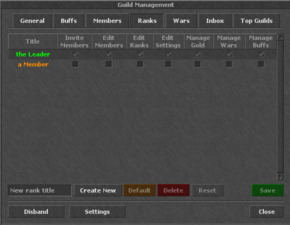
| Under the Ranks Tab, you can:
| |
| | |
| Set permissions for each rank.
| |
| | |
| Rename guild ranks.
| |
| | |
| <br>
| |
| <br>
| |
| <br>
| |
| <br>
| |
| <br>
| |
| | |
| == Guild Wars ==
| |
| [[File:Guild War.png|left|thumb|Guild War]]
| |
| | |
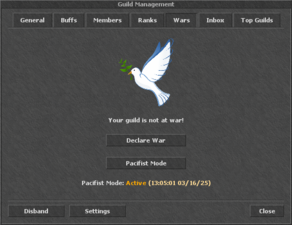
| Newly created guilds are in automatic pacifist mode for 7 days, preventing other guilds from declaring war on them. After 7 days, pacifist mode ends automatically, but guilds can choose to end it early.
| |
| | |
| <br>
| |
| <br>
| |
| <br>
| |
| <br>
| |
| <br>
| |
| | |
| '''FAQ: Forced War & Pacifist Mode'''
| |
| | |
| * Forced War Costs: 100,000 gold
| |
| *
| |
| * Leaving Restriction: Members under attack in a defending guild cannot leave during war.
| |
| *
| |
| * Guild Options When Attacked:
| |
| *
| |
| * Fight the war.
| |
| *
| |
| * Disband the guild.
| |
| *
| |
| * Purchase pacifist status again.
| |
| | |
| '''Recruitment''':
| |
| | |
| * A guild can recruit new members during a war if there are empty slots.
| |
| *
| |
| * A guild can recruit members during the war preparation phase.
| |
| | |
| '''War Preparation''': Forced war initiates a 24-hour preparation period for the defending guild.
| |
| | |
| '''Pacifist Mode Purchase''': Can be bought at any time.
| |
| | |
| '''Pacifist Mode Cooldown''': 3-day cooldown between purchases to prevent abuse.
| |
| | |
| <br>
| |
| <br>
| |
| <br>
| |
| <br>
| |
| <br>
| |
| | |
| == Wage Wars ==
| |
| [[File:Wage Wars.png|left|thumb|Bet Wars]]
| |
| | |
| TibiaScape also features a wage-war system, allowing two guilds to place bets and challenge each other for gold.
| |
| | |
| If [X] Forced War is not selected, the opposing guild receives a wage-war request that they can choose to accept.
| |
| | |
| This improved structure enhances readability, ensures consistent formatting, and makes navigation easier for players looking for specific guild information.
| |

 Create a guild
 Guild overview
 Member management
 Ranks and permissions
 Guild buffs
 War controls


