Jump to content
Toggle menu
Toggle preferences menu
Toggle personal menu
Not logged in
Your IP address will be publicly visible if you make any edits.

Guilds: Difference between revisions

From TibiaScape
Publish the reviewed TibiaScape wiki organization and presentation
Rewrite page as a concise factual reference and repair stale information
 
Line 1: Line 1:
In [[TibiaScape]], guilds are player-run communities designed to bring adventurers together for socializing, questing, and coordinated events. Joining a guild provides exclusive chat channels, shared resources, and a supportive network to tackle challenges collaboratively. Guild membership is essential for players interested in long-term enjoyment of the game.
<div class="tsw-article">
'''Guilds''' are player groups with shared chat, ranks, member management, stored gold, buffs, and war controls.


What makes '''guilds''' different in [https://TibiaScape.com TibiaScape] is the ability to level up your guild, unlocking additional member slots and unique buffs as a team.
{{Guide status|status=Server and client source verified|verified=26 August 2026}}


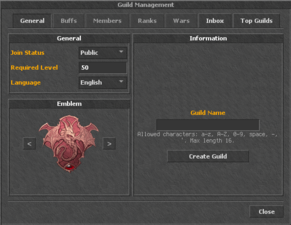
Anyone can create a guild in TibiaScape, provided they are at least '''level 10''' and possess a '''guild permit''', available from the game store.
== Create a guild ==
# Reach level 10 and carry a guild permit.
# Open the guild management window.
# Choose the guild name and settings, then select '''Create Guild'''.


== Creating a Guild ==
The permit is consumed when the guild is created. A level-one guild starts with space for 10 members; each guild level adds one member slot.
[[File:Guildintro.png|thumb|389px|Creating a Guild]]


To create a guild, open the guild management module, select a guild name, and click '''Create Guild'''. There are no extra charges for creating a guild. '''Guild names cannot be changed once created, so choose carefully.'''
<gallery mode="packed" heights="150">
File:Guildintro.png|Create a guild
File:Guildfounded.png|Guild overview
File:MembersPage.png|Member management
File:Ranks.png|Ranks and permissions
File:Guild Buffs.png|Guild buffs
File:Guild War.png|War controls
</gallery>


== Guild Management ==
== Management ==
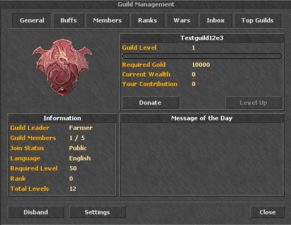
[[File:Guildfounded.png|thumb|388px|Guild Overview After Creation]]
* Members can deposit gold toward guild levels.
* Leaders can manage ranks, permissions, invitations, settings, buffs, and wars.
* New guilds receive seven days of Pacifist Mode.
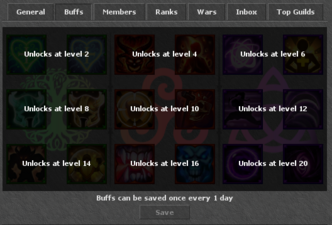
* Saved guild buffs cannot be changed again for four hours.
</div>


After your guild has been created, you can start contributing resources, manage members, unlock new member slots, and access guild-specific features.
== Guild Buffs ==
[[File:Guild Buffs.png|thumb|Guild Buffs Page]]
Guilds can unlock special buffs by leveling up together. These buffs provide significant advantages and can be changed once every 24 hours.
== Guild Members ==
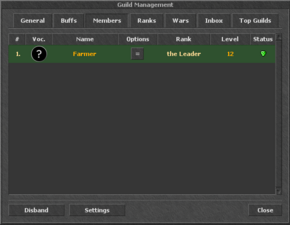
[[File:MembersPage.png|thumb|Guild Members Management]]
As a guild leader, you have comprehensive control over member management. You can modify ranks, track individual contributions, check player levels, monitor activity, and see online statuses.
== Guild Ranks ==
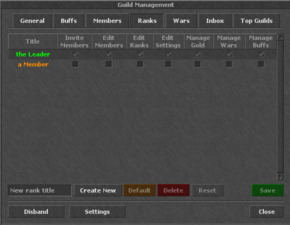
[[File:Ranks.png|thumb|Guild Rank Management]]
The ranks tab allows you to create, modify, and manage guild ranks and set specific permissions for each rank.
== Guild Wars ==
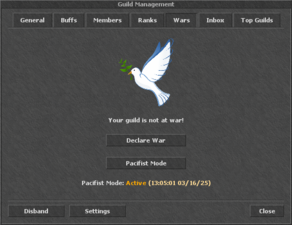
[[File:Guild War.png|thumb|Guild War Management]]
New guilds automatically receive 7 days of '''Pacifist Mode''', preventing other guilds from declaring war during this period. Pacifist Mode ends automatically after 7 days but can be terminated earlier by the guild leader.
=== FAQ: Forced Wars & Pacifist Status ===
A guild can initiate a forced war against any guild '''not''' currently in Pacifist Mode. This costs '''100,000 gold'''.
Members of a guild under forced war attack cannot leave the guild.
A guild under forced war attack can choose to:
** Fight back
** Disband the guild
** Purchase Pacifist Mode
Guilds can recruit new members during war if member slots are available.
A 24-hour preparation period begins immediately upon declaration of a forced war.
Pacifist Mode can be repurchased anytime but has a 3-day cooldown between purchases to prevent abuse.
== Wage Wars ==
[[File:Wage Wars.png|thumb|Wage Wars Feature]]
TibiaScape also offers a '''wage-war''' system, allowing guilds to challenge each other with bets. If the '''Forced War''' checkbox is '''not selected''', the opposing guild receives an invitation to accept or decline the war voluntarily.
[[Category:Community]]
[[Category:Community]]

Latest revision as of 01:58, 26 August 2026

Guilds are player groups with shared chat, ranks, member management, stored gold, buffs, and war controls.

Guide status: Server and client source verifiedLast verified: 26 August 2026

Create a guild

  1. Reach level 10 and carry a guild permit.
  2. Open the guild management window.
  3. Choose the guild name and settings, then select Create Guild.

The permit is consumed when the guild is created. A level-one guild starts with space for 10 members; each guild level adds one member slot.

Management

  • Members can deposit gold toward guild levels.
  • Leaders can manage ranks, permissions, invitations, settings, buffs, and wars.
  • New guilds receive seven days of Pacifist Mode.
  • Saved guild buffs cannot be changed again for four hours.