
Cam System
From TibiaScape
More actions
The Cam System records game sessions automatically and replays them from the character list.
Guide status: Server source verifiedLast verified: 26 August 2026
-
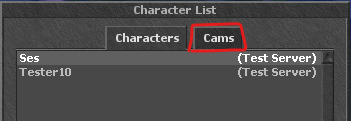 Open the Cams tab
 -
 Playback controls


Watch a recording
- Open the Cams tab.
- Select a recording and log in.
- Use the controls or commands below.
Playback commands
| Command | Action |
|---|---|
/goto 120
|
Go to 120 seconds. |
/back 30
|
Go back 30 seconds. |
/forward 30
|
Go forward 30 seconds. |
/share
|
Show the recording login and password for sharing. |
Use Ctrl+Left or Ctrl+Right to skip. Use Ctrl+Up or Ctrl+Down to change playback speed.